Chapter 2Methods for
Describing Sets
of Data
ALWAYS LEARNING
Copyright © 2018, 2014, and 2011 Pearson Education, Inc.
Slide – 1
Contents
1. Describing Qualitative Data
2. Graphical Methods for Describing
Quantitative Data
3. Numerical Measures of Central
Tendency
4. Numerical Measures of Variability
5. Using the Mean and Standard Deviation
to Describe Data
ALWAYS LEARNING
Copyright © 2018, 2014, and 2011 Pearson Education, Inc.
Slide – 2
Contents (cont)
6. Numerical Measures of Relative
Standing
7. Methods for Detecting Outliers: Box
Plots and z-scores
8. Distorting the Truth with Descriptive
Techniques
ALWAYS LEARNING
Copyright © 2018, 2014, and 2011 Pearson Education, Inc.
Slide – 3
Learning Objectives
1. Describe data using graphs
2. Describe data using numerical measures
3. Describe quantitative data using
numerical measures
4. Detecting descriptive methods that
distort the truth
ALWAYS LEARNING
Copyright © 2018, 2014, and 2011 Pearson Education, Inc.
Slide – 4
2.1
Describing Qualitative Data
ALWAYS LEARNING
Copyright © 2018, 2014, and 2011 Pearson Education, Inc.
Slide – 5
Key Terms
A class is one of the categories into which
qualitative data can be classified.
The class frequency is the number of
observations in the data set falling into a
particular class.
The class relative frequency is the class
frequency divided by the total numbers of
observations in the data set.
The class percentage is the class relative
frequency multiplied by 100.
ALWAYS LEARNING
Copyright © 2018, 2014, and 2011 Pearson Education, Inc.
Slide – 6
Data Presentation
Data
Presentation
Qualitative
Data
Quantitative
Data
Dot
Plot
Summary
Table
Bar
Graph
Pie
Chart
ALWAYS LEARNING
Pareto
Diagram
Stem-&-Leaf
Display
Frequency
Distribution
Histogram
Copyright © 2018, 2014, and 2011 Pearson Education, Inc.
Slide – 7
Data Presentation
Data
Presentation
Qualitative
Data
Quantitative
Data
Dot
Plot
Summary
Table
Bar
Graph
Pie
Chart
ALWAYS LEARNING
Pareto
Diagram
Stem-&-Leaf
Display
Frequency
Distribution
Histogram
Copyright © 2018, 2014, and 2011 Pearson Education, Inc.
Slide – 8
Summary Table
1. Lists categories & number of elements in
category
2. Obtained by tallying responses in category
3. May show frequencies (counts), % or both
Row Is
Major
Category
Accounting
Economics
Management
Total
ALWAYS LEARNING
Count
130
20
50
200
Copyright © 2018, 2014, and 2011 Pearson Education, Inc.
Tally:
|||| ||||
|||| ||||
Slide – 9
Data Presentation
Data
Presentation
Qualitative
Data
Quantitative
Data
Dot
Plot
Summary
Table
Bar
Graph
Pie
Chart
ALWAYS LEARNING
Pareto
Diagram
Stem-&-Leaf
Display
Frequency
Distribution
Histogram
Copyright © 2018, 2014, and 2011 Pearson Education, Inc.
Slide – 10
Bar Graph
Percent
Used
Also
Frequency
150
Equal Bar
Widths
Bar Height
Shows
Frequency or
%
100
50
0
Acct.
Econ.
Major
Zero Point
ALWAYS LEARNING
Mgmt.
Vertical Bars
for Qualitative
Variables
Copyright © 2018, 2014, and 2011 Pearson Education, Inc.
Slide – 11
Data Presentation
Data
Presentation
Qualitative
Data
Quantitative
Data
Dot
Plot
Summary
Table
Bar
Graph
Pie
Chart
ALWAYS LEARNING
Pareto
Diagram
Stem-&-Leaf
Display
Frequency
Distribution
Histogram
Copyright © 2018, 2014, and 2011 Pearson Education, Inc.
Slide – 12
Pie Chart
1. Shows breakdown of
Majors
total quantity into
categories
Econ.
2. Useful for showing
10% 36°
relative differences
Acct.
65%
3. Angle size
•
Mgmt.
25%
(360°)(percent)
(360°) (10%) = 36°
ALWAYS LEARNING
Copyright © 2018, 2014, and 2011 Pearson Education, Inc.
Slide – 13
Data Presentation
Data
Presentation
Qualitative
Data
Quantitative
Data
Dot
Plot
Summary
Table
Bar
Graph
Pie
Chart
ALWAYS LEARNING
Pareto
Diagram
Stem-&-Leaf
Display
Frequency
Distribution
Histogram
Copyright © 2018, 2014, and 2011 Pearson Education, Inc.
Slide – 14
Pareto Diagram
Like a bar graph, but with the categories arranged
by height in descending order from left to right.
Percent
Used
Also
Frequency
150
Equal Bar
Widths
Bar Height
Shows
Frequency or
%
100
50
0
Acct.
Mgmt.
Major
Zero Point
ALWAYS LEARNING
Econ.
Vertical Bars
for Qualitative
Variables
Copyright © 2018, 2014, and 2011 Pearson Education, Inc.
Slide – 15
Summary
Bar graph: The categories (classes) of the
qualitative variable are represented by bars, where
the height of each bar is either the class frequency,
class relative frequency, or class percentage.
Pie chart: The categories (classes) of the
qualitative variable are represented by slices of a
pie (circle). The size of each slice is proportional to
the class relative frequency.
Pareto diagram: A bar graph with the categories
(classes) of the qualitative variable (i.e., the bars)
arranged by height in descending order from left to
right.
ALWAYS LEARNING
Copyright © 2018, 2014, and 2011 Pearson Education, Inc.
Slide – 16
Thinking Challenge
You’re an analyst for IRI. You want to show the
market shares held by Web browsers in 2016.
Construct a bar graph, pie chart, & Pareto
diagram to describe the data.
Browser
Firefox
Internet Explorer
Safari
Others
ALWAYS LEARNING
Mkt. Share (%)
14
81
4
1
Copyright © 2018, 2014, and 2011 Pearson Education, Inc.
Slide – 17
Market Share (%)
Bar Graph Solution*
100%
80%
60%
40%
20%
0%
Firefox
Internet
Explorer
Safari
Others
Browser
ALWAYS LEARNING
Copyright © 2018, 2014, and 2011 Pearson Education, Inc.
Slide – 18
Pie Chart Solution*
Market Share
Firefox,
14%
Safari, 4%
Others,
1%
Internet
Explorer,
81%
ALWAYS LEARNING
Copyright © 2018, 2014, and 2011 Pearson Education, Inc.
Slide – 19
Market Share (%)
Pareto Diagram Solution*
100%
80%
60%
40%
20%
0%
Internet
Explorer
Firefox
Safari
Others
Browser
ALWAYS LEARNING
Copyright © 2018, 2014, and 2011 Pearson Education, Inc.
Slide – 20
2.2
Graphical Methods for
Describing Quantitative Data
ALWAYS LEARNING
Copyright © 2018, 2014, and 2011 Pearson Education, Inc.
Slide – 21
Data Presentation
Data
Presentation
Qualitative
Data
Quantitative
Data
Dot
Plot
Summary
Table
Bar
Graph
Pie
Chart
ALWAYS LEARNING
Stem-&-Leaf
Display
Histogram
Pareto
Diagram
Copyright © 2018, 2014, and 2011 Pearson Education, Inc.
Slide – 22
Dot Plot
1. Horizontal axis is a scale for the quantitative
variable, e.g., percent.
2. The numerical value of each measurement is
located on the horizontal scale by a dot.
ALWAYS LEARNING
Copyright © 2018, 2014, and 2011 Pearson Education, Inc.
Slide – 23
Data Presentation
Data
Presentation
Qualitative
Data
Quantitative
Data
Dot
Plot
Summary
Table
Bar
Graph
Pie
Chart
ALWAYS LEARNING
Stem-&-Leaf
Display
Histogram
Pareto
Diagram
Copyright © 2018, 2014, and 2011 Pearson Education, Inc.
Slide – 24
Stem-and-Leaf Display
1. Divide each
observation into stem
2 144677
value and leaf value
• Stems are listed in
3 028
order in a column
• Leaf value is
4 1
placed in
corresponding stem
row to right of bar
2. Data: 21, 24, 24, 26, 27, 27, 30, 32, 38, 41
ALWAYS LEARNING
Copyright © 2018, 2014, and 2011 Pearson Education, Inc.
26
Slide – 25
Data Presentation
Data
Presentation
Qualitative
Data
Quantitative
Data
Dot
Plot
Summary
Table
Bar
Graph
Pie
Chart
ALWAYS LEARNING
Stem-&-Leaf
Display
Histogram
Pareto
Diagram
Copyright © 2018, 2014, and 2011 Pearson Education, Inc.
Slide – 26
We will let Minitab determine the number of classes for us.
ALWAYS LEARNING
Copyright © 2018, 2014, and 2011 Pearson Education, Inc.
Slide – 27
Histogram
Class
15.5 – 25.5
25.5 – 35.5
35.5 – 45.5
Count
5
Frequency
Relative
Frequency
Percent
4
Freq.
3
5
2
3
Bars
Touch
2
1
0
0
15.5
25.5
35.5
45.5
55.5
Lower Boundary
ALWAYS LEARNING
Copyright © 2018, 2014, and 2011 Pearson Education, Inc.
Slide – 28
Summary
Dot plot: The numerical value of each quantitative
measurement in the data set is represented by a dot
on a horizontal scale. When data values repeat, the
dots are placed above one another vertically.
Stem-and-leaf display: The numerical value of the
quantitative variable is partitioned into a “stem” and a
“leaf.” The possible stems are listed in order in a
column. The leaf for each quantitative measurement in
the data set is placed in the corresponding stem row.
Leaves for observations with the same stem value are
listed in increasing order horizontally.
ALWAYS LEARNING
Copyright © 2018, 2014, and 2011 Pearson Education, Inc.
Slide – 29
Summary
Histogram: The possible numerical values of the
quantitative variable are partitioned into class intervals,
where each interval has the same width. These
intervals form the scale of the horizontal axis. The
frequency or relative frequency of observations in each
class interval is determined. A horizontal bar is placed
over each class interval, with height equal to either the
class frequency or class relative frequency.
ALWAYS LEARNING
Copyright © 2018, 2014, and 2011 Pearson Education, Inc.
Slide – 30
2.3
Numerical Measures
of Central Tendency
ALWAYS LEARNING
Copyright © 2018, 2014, and 2011 Pearson Education, Inc.
Slide – 31
Two Characteristics
The central tendency of the set of
measurements–that is, the tendency of the
data to cluster, or center, about certain
numerical values.
Central Tendency
(Location)
ALWAYS LEARNING
Copyright © 2018, 2014, and 2011 Pearson Education, Inc.
Slide – 32
Two Characteristics
The variability of the set of measurements–
that is, the spread of the data.
Variation
(Dispersion)
ALWAYS LEARNING
Copyright © 2018, 2014, and 2011 Pearson Education, Inc.
Slide – 33
Mean
The mean of a set of quantitative data is the
sum of the measurements divided by the
number of measurements contained in the
data set.
n
xi
x i 1
n
ALWAYS LEARNING
Copyright © 2018, 2014, and 2011 Pearson Education, Inc.
Slide – 34
Summation Notation
To learn how to work with the Summation
Notation, read this note.
To view a pre-recorded lecture based on this
note, click here.
ALWAYS LEARNING
Copyright © 2018, 2014, and 2011 Pearson Education, Inc.
Slide – 35
Example
Calculate the mean of the following six sample
measurements:
10.3, 4.9, 8.9, 11.7 , 6.3 , 7.7
n
x
x
i 1
n
i
10.3 4.9 8.9 11.7 6.3 7.7
6
49.8
8.3
6
ALWAYS LEARNING
Copyright © 2018, 2014, and 2011 Pearson Education, Inc.
Slide – 36
Symbols for the Sample and
Population Mean
In this text, we adopt a general policy of
using Greek letters to represent population
numerical descriptive measures and Roman
letters to represent corresponding
descriptive measures for the sample. The
symbols for the mean are
Sample mean x
Population mean
ALWAYS LEARNING
Copyright © 2018, 2014, and 2011 Pearson Education, Inc.
Slide – 37
Median
1. Measure of central tendency
2. Middle value in ordered sequence
If n is odd, middle value of sequence
If n is even, average of 2 middle values
3. Position of median in sequence
n 1
Positioning Point
2
4. Not affected by extreme values
ALWAYS LEARNING
Copyright © 2018, 2014, and 2011 Pearson Education, Inc.
Slide – 38
Median Example Odd-Sized Sample
Raw Data: 24.1 22.6 21.5 23.7 22.6
Ordered: 21.5 22.6 22.6 23.7 24.1
Position:
1
2
3
4
5
Median = 22.6
ALWAYS LEARNING
Copyright © 2018, 2014, and 2011 Pearson Education, Inc.
Slide – 39
Median Example Even-Sized Sample
Raw Data: 10.3 4.9 8.9 11.7 6.3 7.7
Ordered:
4.9 6.3 7.7 8.9 10.3 11.7
Position:
1
2
3
4
5
6
7.7 8.9
Median
8.3
2
ALWAYS LEARNING
Copyright © 2018, 2014, and 2011 Pearson Education, Inc.
Slide – 40
Skewed
A data set is said to be skewed if one tail of the
distribution has more extreme observations than
the other tail.
ALWAYS LEARNING
Copyright © 2018, 2014, and 2011 Pearson Education, Inc.
Slide – 41
Shape
1. Describes how data are distributed
2. Measures of Shape
Left-Skewed
Mean Median
ALWAYS LEARNING
Symmetric
Mean = Median
Right-Skewed
Median Mean
Copyright © 2018, 2014, and 2011 Pearson Education, Inc.
Slide – 42
Mode
1. Measure of central tendency
2. Value that occurs most often
3. Not affected by extreme values
4. May be no mode or several modes
5. May be used for quantitative or
qualitative data
ALWAYS LEARNING
Copyright © 2018, 2014, and 2011 Pearson Education, Inc.
Slide – 43
Mode Example
No Mode
Raw Data: 10.3 4.9 8.9 11.7 6.3 7.7
One Mode
Raw Data: 6.3 4.9 8.9 6.3 4.9 4.9
More Than 1 Mode
Raw Data: 21 28
ALWAYS LEARNING
28
41
43
43
Copyright © 2018, 2014, and 2011 Pearson Education, Inc.
Slide – 44
Thinking Challenge
You’re a financial analyst
for Prudential-Bache
Securities. You have
collected the following
closing stock prices of
new stock issues: 17, 16,
21, 18, 13, 16, 12, 11.
Describe the stock prices
in terms of central
tendency.
ALWAYS LEARNING
Copyright © 2018, 2014, and 2011 Pearson Education, Inc.
Slide – 45
Solution
17, 16, 21, 18, 13, 16, 12, 11
17 16 21 18 13 16 12 11
x
8
15.5
Raw Data: 17 16 21 18 13 16 12 11
Ordered:
11 12 13 16 16 17 18 21
Median = 16
ALWAYS LEARNING
Copyright © 2018, 2014, and 2011 Pearson Education, Inc.
Slide – 46
Solution (cont)
Mode
Raw Data: 17 16 21 18 13 16 12 11
Mode = 16
ALWAYS LEARNING
Copyright © 2018, 2014, and 2011 Pearson Education, Inc.
Slide – 47
Suggested Exercises
Work out the following exercises from the
Textbook :
2.37, 2.38, 2.41, 2.46, 2.49, 2.51, 2.55
These exercises will not be collected or graded,
but let me know as questions arise.
ALWAYS LEARNING
Copyright © 2018, 2014, and 2011 Pearson Education, Inc.
Slide – 48
2.4
Numerical Measures
of Variability
ALWAYS LEARNING
Copyright © 2018, 2014, and 2011 Pearson Education, Inc.
Slide – 49
Range
1. Measure of dispersion
2. Difference between largest & smallest
observations
Range = xlargest – xsmallest
3. Ignores how data are distributed
7 8 9 10
7 8 9 10
Range = 10 – 7 = 3
ALWAYS LEARNING
Range = 10 – 7 = 3
Copyright © 2018, 2014, and 2011 Pearson Education, Inc.
Slide – 50
Range can be misleading
Let’s examine the two datasets below:
Dataset 1:
Values
Frequencies
Dataset 2:
-10,000
1
0 10,000
Values
99
Frequencies
Range = 10000 – (-10000) = 20000
1
-10,000
50
0 10,000
1
50
Range = 10000 – (-10000) = 20000
Which dataset is more variable?
ALWAYS LEARNING
Copyright © 2018, 2014, and 2011 Pearson Education, Inc.
Slide – 51
Variance &
Standard Deviation
1. Measures of dispersion
2. Most common measures
3. Consider how data are distributed
4. Show variation about mean (x or μ)
x = 8.3
4
6
ALWAYS LEARNING
8 10 12
Copyright © 2018, 2014, and 2011 Pearson Education, Inc.
Slide – 52
Sample Variance Formula
n
s2
x
i 1
i
x
2
n 1
x1 x x2 x
2
2
xn x
2
n 1
Standard Deviation is the positive
square root of Variance.
ALWAYS LEARNING
Copyright © 2018, 2014, and 2011 Pearson Education, Inc.
Slide – 53
Sample Variance Formula
From page 8 of the note on Summation Notation:
ALWAYS LEARNING
Copyright © 2018, 2014, and 2011 Pearson Education, Inc.
Slide – 54
Sample Variance Formula
Here is the sample variance formula in English:
1. Calculate the Sum of the data values
2. Calculate the Sum of Squares of the data
values
3. Divide the Square of Sum by the number of
data values and subtract the result from the
Sum of Squares
4. Divide the result of Step 3 by (the number of
data values minus 1)
ALWAYS LEARNING
Copyright © 2018, 2014, and 2011 Pearson Education, Inc.
Slide – 55
Symbols for Variance and Standard
Deviation
s2 = Sample variance
s = Sample standard deviation
2 = Population variance
= Population standard deviation
ALWAYS LEARNING
Copyright © 2018, 2014, and 2011 Pearson Education, Inc.
Slide – 56
Example
Calculate the variance and standard
deviation. 10.3, 4.9, 8.9, 11.7, 6.3, 7.7
Solution
The first step is finding the mean. Which we
calculated earlier to be 8.3.
(10.3 8.3) (4.9 8.3) … (7.7 8.3)
s
6 1
s 2 6.368
2
2
2
2
s 6.368 2.52
ALWAYS LEARNING
Copyright © 2018, 2014, and 2011 Pearson Education, Inc.
Slide – 57
Thinking Challenge
You’re a financial analyst
for Prudential-Bache
Securities. You have
collected the following
closing stock prices of
new stock issues: 17, 16,
21, 18, 13, 16, 12, 11.
What are the variance
and standard deviation
of the stock prices?
ALWAYS LEARNING
Copyright © 2018, 2014, and 2011 Pearson Education, Inc.
Slide – 58
Thinking Challenge Solution
Sample Variance
17 16 21 18 13
16
12
11
The mean = 15.5
(17 15.5) (16 15.5) … (11 15.5)
s
8 1
11.14
2
2
2
2
s 11.14 3.337
ALWAYS LEARNING
Copyright © 2018, 2014, and 2011 Pearson Education, Inc.
Slide – 59
Minitab Calculations
This tutorial shows how to calculate the mean,
median, range, and standard deviation of a data
set, when the data structure is that of a “linear
array.” What that means is the following: All of your
data values are in one column of your
spreadsheet, as opposed to a “frequency
distribution.”
It also illustrates the calculation of some other
descriptive measures that we have not yet
discussed. Remember to view the tutorial again
after finishing slide #91.
ALWAYS LEARNING
Copyright © 2018, 2014, and 2011 Pearson Education, Inc.
Slide – 60
An example
The following example, Psychology Final,
illustrates how to calculate the mean and the
standard deviation from a frequency
distribution.
It also includes some other calculations. We
have not yet discussed the underlying
concepts. As such, at this stage you should
simply note that this is an example you
should come back to.
ALWAYS LEARNING
Copyright © 2018, 2014, and 2011 Pearson Education, Inc.
Slide – 61
Suggested Exercises
Work out the following exercises from the
Textbook :
2.57, 2.61, 2.63, 2.68
These exercises will not be collected or graded,
but let me know as questions arise.
ALWAYS LEARNING
Copyright © 2018, 2014, and 2011 Pearson Education, Inc.
Slide – 62
2.5
Using the Mean and Standard
Deviation to Describe Data
ALWAYS LEARNING
Copyright © 2018, 2014, and 2011 Pearson Education, Inc.
Slide – 63
Using the Mean and Standard Deviation
to Describe Data: Chebyshev’s Rule
ALWAYS LEARNING
Copyright © 2018, 2014, and 2011 Pearson Education, Inc.
Slide – 64
Interpreting Standard Deviation:
Chebyshev’s Theorem
x 3s
x 2s
x s
x
xs
x 2s
x 3s
No useful information
At least 3/4 of the data
At least 8/9 of the data
ALWAYS LEARNING
Copyright © 2018, 2014, and 2011 Pearson Education, Inc.
Slide – 65
Chebyshev’s Theorem Example
Previously we found the mean
closing stock price of new stock
issues is 15.5 and the standard
deviation is 3.34.
Use this information to form an
interval that will contain at least
75% of the closing stock prices
of new stock issues.
ALWAYS LEARNING
Copyright © 2018, 2014, and 2011 Pearson Education, Inc.
Slide – 66
Chebyshev’s Theorem Example
At least 75% of the closing stock prices of new
stock issues will lie within 2 standard deviations of
the mean.
x = 15.5
s = 3.34
(x – 2s, x + 2s) = (15.5 – 2∙3.34, 15.5 + 2∙3.34)
= (8.82, 22.18)
ALWAYS LEARNING
Copyright © 2018, 2014, and 2011 Pearson Education, Inc.
Slide – 67
Another Chebyshev’s Theorem Example
The example, Lumber Company, illustrates
a more sophisticated use of Chebyshev’s
Theorem.
ALWAYS LEARNING
Copyright © 2018, 2014, and 2011 Pearson Education, Inc.
Slide – 68
Interpreting Standard Deviation:
Empirical Rule
Applies to data sets that are mound shaped and
symmetric (How do you know if your data set is
mound shaped and symmetric?)
Approximately 68% of the measurements lie in the
interval x s to x s
Approximately 95% of the measurements lie in the
interval x 2s to x 2s
Approximately 99.7% of the measurements lie in
the interval x 3s to x 3s
ALWAYS LEARNING
Copyright © 2018, 2014, and 2011 Pearson Education, Inc.
Slide – 69
Interpreting Standard Deviation:
Empirical Rule
x – 3s
x – 2s
x–s
x
x+s
x +2s
x + 3s
Approximately 68% of the measurements
Approximately 95% of the measurements
Approximately 99.7% of the measurements
ALWAYS LEARNING
Copyright © 2018, 2014, and 2011 Pearson Education, Inc.
Slide – 70
Empirical Rule Example
Previously we found the
mean closing stock price of
new stock issues is 15.5
and the standard deviation
is 3.34. If we can assume
the data is symmetric and
mound shaped, calculate
the percentage of the data
that lie within the intervals
x s, x 2s, x 3s.
ALWAYS LEARNING
Copyright © 2018, 2014, and 2011 Pearson Education, Inc.
Slide – 71
Empirical Rule Example
According to the Empirical Rule, approximately 68% of
the data will lie in the interval ( x s, x s ),
(15.5 – 3.34, 15.5 + 3.34) = (12.16, 18.84)
Approximately 95% of the data will lie in the interval
( x 2 s, x 2 s ),
(15.5 – 2∙3.34, 15.5 + 2∙3.34) = (8.82, 22.18)
Approximately 99.7% of the data will lie in the interval
( x 3s, x 3s ),
(15.5 – 3∙3.34, 15.5 + 3∙3.34) = (5.48, 25.52)
ALWAYS LEARNING
Copyright © 2018, 2014, and 2011 Pearson Education, Inc.
Slide – 72
Empirical Rule Example
Waist circumferences of adult females have a moundshaped distribution with a mean of 36 in. and a standard
deviation of 3.5 in. What proportion of adult females
have a waist circumference
a. between 32.5 and 39.5 in?
b. between 29 and 39.5 in?
c. less than 32.5 in?
d. greater than 32.5 in?
To view the solution, click here.
ALWAYS LEARNING
Copyright © 2018, 2014, and 2011 Pearson Education, Inc.
Slide – 73
Psychology Final
The Psychology Final example that we
mentioned earlier discusses an idea related
to the empirical rule. In my opinion, you are
not yet ready to review this example, so
move on.
ALWAYS LEARNING
Copyright © 2018, 2014, and 2011 Pearson Education, Inc.
Slide – 74
Empirical Rule versus Chebyshev’s Rule
You know the mean and the standard deviation of a dataset, but don’t have access
to the original data values.
This is a fairly common situation.
You need to get a handle on the proportion of data values within two standard
deviations of the mean.
Should you use the empirical rule or the Chebyshev’s rule?
Since you don’t have access to the original data values, you can’t create the
histogram to see the shape of the distribution.
Sometimes from the context you may be able to guess that the distribution will be
mound shaped. Even if you can’t make such a guess, you are better off using the
empirical rule, since Chebyshev’s rule based projections are very conservative
where as empirical rule is quite robust with respect to the violation of the mound
shaped assumption.
ALWAYS LEARNING
Copyright © 2018, 2014, and 2011 Pearson Education, Inc.
Slide – 75
Suggested Exercises
Work out the following exercises from the
Textbook :
2.74, 2.76, 2.79, 2.88
These exercises will not be collected or graded,
but let me know as questions arise.
ALWAYS LEARNING
Copyright © 2018, 2014, and 2011 Pearson Education, Inc.
Slide – 76
2.6
Numerical Measures
of Relative Standing
ALWAYS LEARNING
Copyright © 2018, 2014, and 2011 Pearson Education, Inc.
Slide – 77
Numerical Measures of
Relative Standing: Percentiles
Describes the relative location of a
measurement compared to the rest of the
data are called measures of relative
standing.
The pth percentile is a number such that p%
of the data falls below it and (100 – p)% falls
above it
Median = 50th percentile
ALWAYS LEARNING
Copyright © 2018, 2014, and 2011 Pearson Education, Inc.
Slide – 78
Quartiles
Measure of noncentral tendency
Split ordered data into 4 quarters
25%
25%
Q1
25%
Q2
25%
Q3
Lower quartile QL is 25th percentile.
Middle quartile m is the median.
Upper quartile QU is 75th percentile.
ALWAYS LEARNING
Copyright © 2018, 2014, and 2011 Pearson Education, Inc.
Slide – 79
Percentile Example
You scored 560 on the GMAT exam. This
score puts you in the 58th percentile.
What percentage of test takers scored lower
than you did?
58% of test takers scored lower than 560.
What percentage of test takers scored
higher than you did?
(100 – 58)% = 42% of test takers scored
higher than 560.
ALWAYS LEARNING
Copyright © 2018, 2014, and 2011 Pearson Education, Inc.
Slide – 80
How to calculate a Percentile
To learn how to calculate any percentile of a given
data set, read this note.
To view a pre-recorded lecture based on this note,
click here.
The example, Psychology Final, illustrates how to
calculate a percentile form a frequency distribution.
You should now review the Psychology Final
example.
ALWAYS LEARNING
Copyright © 2018, 2014, and 2011 Pearson Education, Inc.
Slide – 81
Numerical Measures of
Relative Standing: z–Scores
Describes the relative location of a measurement
compared to the rest of the data
Sample z–score
xx
z
s
Population z–score
z
x µ
Measures the number of standard deviations away
from the mean a data value is located
ALWAYS LEARNING
Copyright © 2018, 2014, and 2011 Pearson Education, Inc.
Slide – 82
z–Score Example
The mean time to assemble a
product is 22.5 minutes with a
standard deviation of 2.5 minutes.
Find the z–score for an item that
took 20 minutes to assemble.
Find the z–score for an item that
took 27.5 minutes to assemble.
ALWAYS LEARNING
Copyright © 2018, 2014, and 2011 Pearson Education, Inc.
Slide – 83
z-Score Example (cont)
x = 20, μ = 22.5 σ = 2.5
z
x
20 22.5
1.0
2.5
x = 27.5, μ = 22.5 σ = 2.5
z
x
27.5 22.5
2.0
2.5
ALWAYS LEARNING
Copyright © 2018, 2014, and 2011 Pearson Education, Inc.
Slide – 84
Interpretation of z–Scores for
Mound-Shaped Distributions of Data
1.
2.
3.
Approximately 68% of the measurements will have a
z-score between –1 and 1.
Approximately 95% of the measurements will have a
z-score between –2 and 2.
Approximately 99.7% of the measurements will have
a z-score between –3 and 3.
(see the figure on the next slide)
See the note on the mean and standard deviation of linearly
transformed data in this context
ALWAYS LEARNING
Copyright © 2018, 2014, and 2011 Pearson Education, Inc.
Slide – 85
Interpretation of z–Scores
ALWAYS LEARNING
Copyright © 2018, 2014, and 2011 Pearson Education, Inc.
Slide – 86
Suggested Exercises
Work out the following exercises from the
Textbook :
2.96, 2.103
These exercises will not be collected or graded,
but let me know as questions arise.
ALWAYS LEARNING
Copyright © 2018, 2014, and 2011 Pearson Education, Inc.
Slide – 87
2.7
Methods for Detecting Outliers:
Box Plots and z-Scores
ALWAYS LEARNING
Copyright © 2018, 2014, and 2011 Pearson Education, Inc.
Slide – 88
Outlier
An observation (or measurement) that is unusually
large or small relative to the other values in a data
set is called an outlier. Outliers typically are
attributable to one of the following causes:
1. The measurement is observed, recorded, or
entered into the computer incorrectly.
2. The measurement comes from a different
population.
3. The measurement is correct but represents a
rare (chance) event.
ALWAYS LEARNING
Copyright © 2018, 2014, and 2011 Pearson Education, Inc.
Slide – 89
Quartiles Review
Measure of noncentral tendency
Split ordered data into 4 quarters
25%
25%
Q1
25%
Q2
25%
Q3
Lower quartile QL is 25th percentile.
Middle quartile m is the median.
Upper quartile QU is 75th percentile.
Interquartile range: IQR = QU – QL
ALWAYS LEARNING
Copyright © 2018, 2014, and 2011 Pearson Education, Inc.
Slide – 90
Interquartile Range
1. Measure of dispersion
2. Also called midspread
3. Difference between upper and lower
quartiles
Interquartile Range = QU – QL
4. Spread in middle 50%
5. Not affected by extreme values
Review the tutorial once more.
ALWAYS LEARNING
Copyright © 2018, 2014, and 2011 Pearson Education, Inc.
Slide – 91
Thinking Challenge
You’re a financial analyst
for Prudential-Bache
Securities. You have
collected the following
closing stock prices of
new stock issues: 17, 16,
21, 18, 13, 16, 12, 11.
What are the quartiles,
Q1 and Q3, and the
interquartile range?
ALWAYS LEARNING
Copyright © 2018, 2014, and 2011 Pearson Education, Inc.
Slide – 92
Box Plot
1. Graphical display of data using 5-number
summary
Xsmallest Q 1 Median Q 3
4
6
ALWAYS LEARNING
8
10
Xlargest
12
Copyright © 2018, 2014, and 2011 Pearson Education, Inc.
Slide – 93
Boxplot
Watch this tutorial for a comprehensive
review of Boxplot.
ALWAYS LEARNING
Copyright © 2018, 2014, and 2011 Pearson Education, Inc.
Slide – 94
Shape & Box Plot
Left-Skewed
Q 1 Median Q3
ALWAYS LEARNING
Symmetric
Q1
Median Q 3
Right-Skewed
Q 1 Median Q 3
Copyright © 2018, 2014, and 2011 Pearson Education, Inc.
Slide – 95
Detecting Outliers
Box Plots: Observations falling between the
inner and outer fences are deemed
suspect outliers. Observations falling
beyond the outer fence are deemed
highly suspect outliers.
z-scores: Observations with z-scores
greater than 3 in absolute value are
considered outliers. (For some highly
skewed data sets, observations with zscores greater than 2 in absolute value
may be outliers.)
ALWAYS LEARNING
Copyright © 2018, 2014, and 2011 Pearson Education, Inc.
Slide – 96
Suggested Exercises
Work out the following exercises from the
Textbook :
2.110, 2.111, 2.114, 2.117
These exercises will not be collected or graded,
but let me know as questions arise.
ALWAYS LEARNING
Copyright © 2018, 2014, and 2011 Pearson Education, Inc.
Slide – 97
2.10
Distorting the Truth with
Descriptive Statistics
ALWAYS LEARNING
Copyright © 2018, 2014, and 2011 Pearson Education, Inc.
Slide – 98
Errors in Presenting Data
1. Use area to equate to value
2. No relative basis in comparing data
batches
3. Compress the vertical axis
4. No zero point on the vertical axis
5. Gap in the vertical axis
6. Use of misleading wording
7. Knowing central tendency without
knowing variability
ALWAYS LEARNING
Copyright © 2018, 2014, and 2011 Pearson Education, Inc.
Slide – 99
Reader Equates Area to Value
Bad Presentation
Good Presentation
Minimum Wage
Minimum Wage
1960: $1.00
4
$
1970: $1.60
2
1980: $3.10
0
1990: $3.80
ALWAYS LEARNING
1960
1970
1980
Copyright © 2018, 2014, and 2011 Pearson Education, Inc.
1990
Slide – 100
No Relative Basis
Bad Presentation
300
Freq.
Good Presentation
A’s by Class
A’s by Class
30%
200
20%
100
10%
0
0%
FR SO
JR
ALWAYS LEARNING
SR
%
FR SO JR SR
Copyright © 2018, 2014, and 2011 Pearson Education, Inc.
Slide – 101
Compressing
Vertical Axis
Bad Presentation
Good Presentation
Quarterly Sales
200
Quarterly Sales
$
50
100
25
0
0
Q1 Q2 Q3 Q4
ALWAYS LEARNING
$
Q1
Q2
Q3
Copyright © 2018, 2014, and 2011 Pearson Education, Inc.
Q4
Slide – 102
No Zero Point
on Vertical Axis
Bad Presentation
Good Presentation
Monthly Sales
45
Monthly Sales
$
60
42
40
39
20
36
0
J M M J
S N
ALWAYS LEARNING
$
J
M M J
S
Copyright © 2018, 2014, and 2011 Pearson Education, Inc.
N
Slide – 103
Gap in the Vertical Axis
Bad Presentation
ALWAYS LEARNING
Copyright © 2018, 2014, and 2011 Pearson Education, Inc.
Slide – 104
Changing the Wording
Changing the title of the graph can influence the
reader.
We’re not doing so well.
Still in prime years!
ALWAYS LEARNING
Copyright © 2018, 2014, and 2011 Pearson Education, Inc.
Slide – 105
Knowing only central tendency
Knowing ONLY the central tendency might lead
one to purchase Model A. Knowing the
variability as well may change one’s decision!
ALWAYS LEARNING
Copyright © 2018, 2014, and 2011 Pearson Education, Inc.
Slide – 106
Key Ideas
Describing Qualitative Data
1.
2.
3.
4.
Identify category classes
Determine class frequencies
Class relative frequency = (class freq)/n
Graph relative frequencies
ALWAYS LEARNING
Copyright © 2018, 2014, and 2011 Pearson Education, Inc.
Slide – 107
Key Ideas
Graphing Quantitative Data
1 Variable
1. Identify class intervals
2. Determine class interval frequencies
3. Class interval relative frequency =
(class interval frequencies)/n
4. Graph class interval relative
frequencies
ALWAYS LEARNING
Copyright © 2018, 2014, and 2011 Pearson Education, Inc.
Slide – 108
Key Ideas
Graphing Quantitative Data
2 Variables
Scatterplot
Time series plot
ALWAYS LEARNING
Copyright © 2018, 2014, and 2011 Pearson Education, Inc.
Slide – 109
Key Ideas
Numerical Description of Quantitative Data
Central Tendency
Mean
Median
Mode
ALWAYS LEARNING
Copyright © 2018, 2014, and 2011 Pearson Education, Inc.
Slide – 110
Key Ideas
Numerical Description of Quantitative Data
Variation
Range
Variance
Standard Deviation
Interquartile range
ALWAYS LEARNING
Copyright © 2018, 2014, and 2011 Pearson Education, Inc.
Slide – 111
Key Ideas
Numerical Description of Quantitative Data
Relative standing
Percentile score
z-score
ALWAYS LEARNING
Copyright © 2018, 2014, and 2011 Pearson Education, Inc.
Slide – 112
Key Ideas
Rules for Detecting Quantitative Outliers
Interval
x s
x 2s
x 3s
Chebyshev’s Rule
Empirical Rule
At least 0%
≈ 68%
At least 75%
≈ 95%
At least 89%
All
ALWAYS LEARNING
Copyright © 2018, 2014, and 2011 Pearson Education, Inc.
Slide – 113
Key Ideas
Rules for Detecting Quantitative Outliers
Method
Suspect
Highly Suspect
Box plot:
Values
between inner
and outer
fences
Values beyond
outer fences
z-score
2 < |z| < 3
|z| > 3
ALWAYS LEARNING
Copyright © 2018, 2014, and 2011 Pearson Education, Inc.
Slide – 114
STATISTICS 1000Q
Winter Intersession 2020
Please read the following directions carefully and save them for future
reference. You will need them for the subsequent assignments as well.
DIRECTIONS: How to enter a “text” response in an assignment
An example of a question that requires a text response is:
To respond, click once on the gray shaded box, then type. You answer will appear as:
DIRECTIONS: How to “paste” a graph in an assignment
Once you create a graph in Minitab, copy it to the Clipboard. (A graph can be copied to
the clipboard by clicking on Edit and then selecting the Copy Graph option when the graph
window is the active window in Minitab; the keyboard shortcut is CTRL+C.)
Once you are done copying a graph to the clipboard, toggle to the WORD document and
position the cursor inside the designated field. At this stage, all you have to do is to click on
the paste button
on the toolbar or use the keyboard shortcut CTRL+V.
If you are running Minitab on the UConn SkyBox, you must have your WORD document
open in the SkyBox for this copy and paste to work.
Assignment 1
Professor Suman Majumdar
After you complete the assignment, save it under the filename
yourlastname1.
Print your name below
General Instructions
Answer the questions in the fields provided for and submit the resulting document through
HuskyCT.
Question Number
Point Allotted
1a
4
1b
4
2
5
3a
1
3b
1
3c
1
3d
1
3e
1
4
5
5
3
6a
3
6b
1
Point Scored
QUESTION 1
The data contained in this file (for Minitab 18) or this file (for Minitab 19) describes the
gender specific ethnic composition of the student body in a university.
a. Create a bar chart using C3 (Number) as the Y-variable and C1 (Minority) as the
X-variable. Be sure to include appropriate labels (title, axis labels, and a footnote
with your name).
b. Create a pie chart using C1 for the categories and C3 for the frequencies. Be sure
to use an appropriate title.
QUESTION 2
The data contained in this file (for Minitab 18) or this file (for Minitab 19) is enrollment
data by school within a university for the years 1980, 1990 and 2000. Create a cluster bar
chart for the entire data set. In order to do this, you must combine the 1980, 1990, and 2000
data using Cut & Paste.
QUESTION 3
Answer the following questions based on the clustered bar chart below. Note that the
university consists of five schools – the School of Agriculture (AG), the School of Business
Administration (BA), the School of Education (ED), the School of Engineering (ENG),
and the School of Fine Arts (FA).
Faculty Size Across Five Schools and Years
120
Faculty Size
100
80
60
40
20
0
SCHOOL
YEAR
A G BA ED ENG F A
60
19
A G BA EDE NG FA
70
19
A G BA EDE NG FA
80
19
A G BA EDENG F A
90
19
AG BA EDENG F A
00
20
a. In the 1960’s, which school had the most faculty members?
b. In the 1960’s, which school did not yet exist?
c. Which school added the most faculty members between 1960 and 1970?
d. Estimate the total number of faculty at this university in 1980.
e. Which school has had the least variation over time in the number of faculty?
QUESTION 4
This large data set (for Minitab 18) or this large data set (for Minitab 19) contains the
final grades for two Introductory Statistics classes. Create a pair of histograms using the
same scale. Be sure to include appropriate labels (title, axis labels, and a footnote with your
name).
QUESTION 5
This data file (for Minitab 18) or this data file (for Minitab 19) contains the number of
rebounds per game for five starting players on a leading Women’s basketball team. Create
a set of dotplots on the same scale to display the data.
QUESTION 6
This data file (for Minitab 18) or this data file (for Minitab 19) contains points scored by
the winners and by the losers and the point spread. (Notice that point spread equals Winning
Score – Losing Score.) In this example, the winner is a particular Women’s basketball team
that was undefeated for an entire season, 35-0. The losers are the different opposing teams.
a. Construct a stem-and-leaf display of the point spread data (C3).
b. What is the number of games in which the point spread was less than 30 points?
Essay Writing Service Features
Our Experience
No matter how complex your assignment is, we can find the right professional for your specific task. Achiever Papers is an essay writing company that hires only the smartest minds to help you with your projects. Our expertise allows us to provide students with high-quality academic writing, editing & proofreading services.
Free Features
Free revision policy
$10Free bibliography & reference
$8Free title page
$8Free formatting
$8How Our Dissertation Writing Service Works
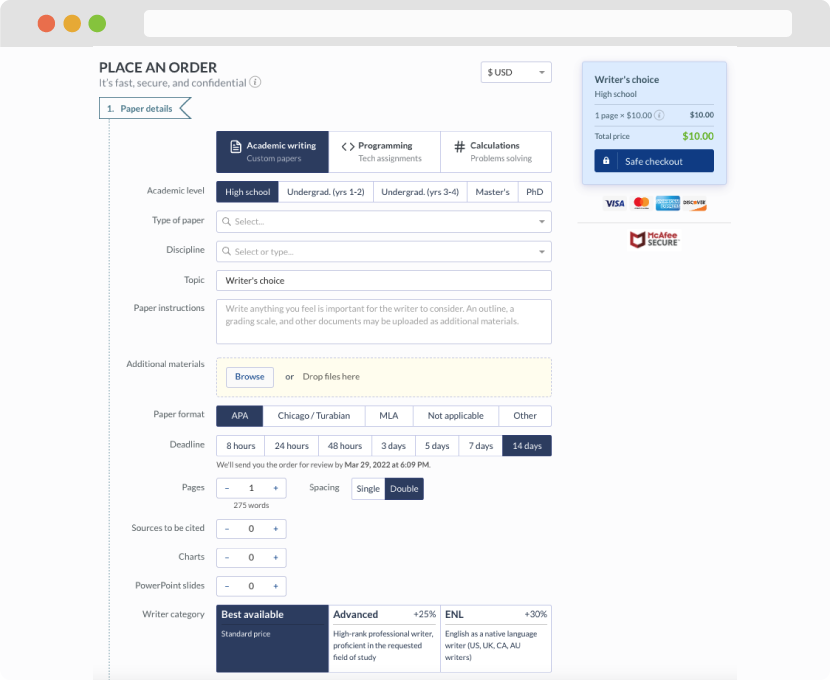
First, you will need to complete an order form. It's not difficult but, if anything is unclear, you may always chat with us so that we can guide you through it. On the order form, you will need to include some basic information concerning your order: subject, topic, number of pages, etc. We also encourage our clients to upload any relevant information or sources that will help.
Complete the order form
Once we have all the information and instructions that we need, we select the most suitable writer for your assignment. While everything seems to be clear, the writer, who has complete knowledge of the subject, may need clarification from you. It is at that point that you would receive a call or email from us.
Writer’s assignment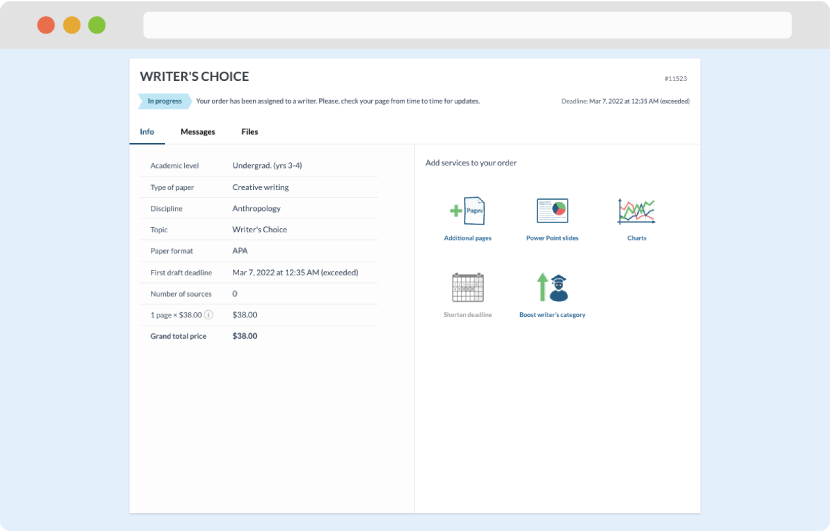
As soon as the writer has finished, it will be delivered both to the website and to your email address so that you will not miss it. If your deadline is close at hand, we will place a call to you to make sure that you receive the paper on time.
Completing the order and download